



マニュアル・サポートページ
ドメイン取得後のメールアドレス実在確認
.comや.netなどの「gTLD / ccTLD」の場合、ドメイン登録情報(WHOIS情報)に、ご登録いただいたのメールアドレスの実在確認が必要となります。
取得後に、レジストラより下記のようなメールが届きますので、メール本文にあるリンク(サンプル内の青色で記載のURL)をクリックの上、必ずお手続きを完了してください。
本手続きを完了されない場合、通知日より15日後に、ドメインのご利用ができなくなりますので、ご注意ください。
ドメイン取得後に、本メールが届かない場合は、弊社サポートまでお問い合わせください。
実在確認メールのサンプル
▼ スクロールをしてご確認ください。
| 件名 | New ICANN requirement: Contact validation |
|---|---|
| 本文 |
Dear Moniker.com Customer, We would like to ask you to verify the accuracy of your registrant contact email address. Verification needs to be completed once for each email address used as your registration contact and all other contacts using the same e-mail address will be considered successfully verified. Please click on the following link to confirm that you have received this email and to validate your email address: https://www.moniker.com/emailverification?trigger=文字列 If the above shown link should be broken, please proceed to https://www.moniker.com/emailverification and enter your personal validation token into the form field: trigger = 文字列 Please note that in case you do not validate your email address, we are required to suspend your domain name registration(s) using these contact details no later than: 有効期限 After the suspension date you can always re-activate your domain name(s) by confirming the address as described above. Thank you for choosing Moniker.com for your domain registrations! Moniker.com |
手続き完了後画面サンプル
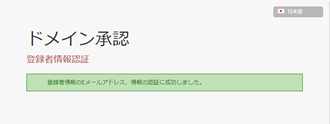
左の画面が表示されましたら、お手続きは完了となります。
ご覧になりたいカテゴリーをお選びください。